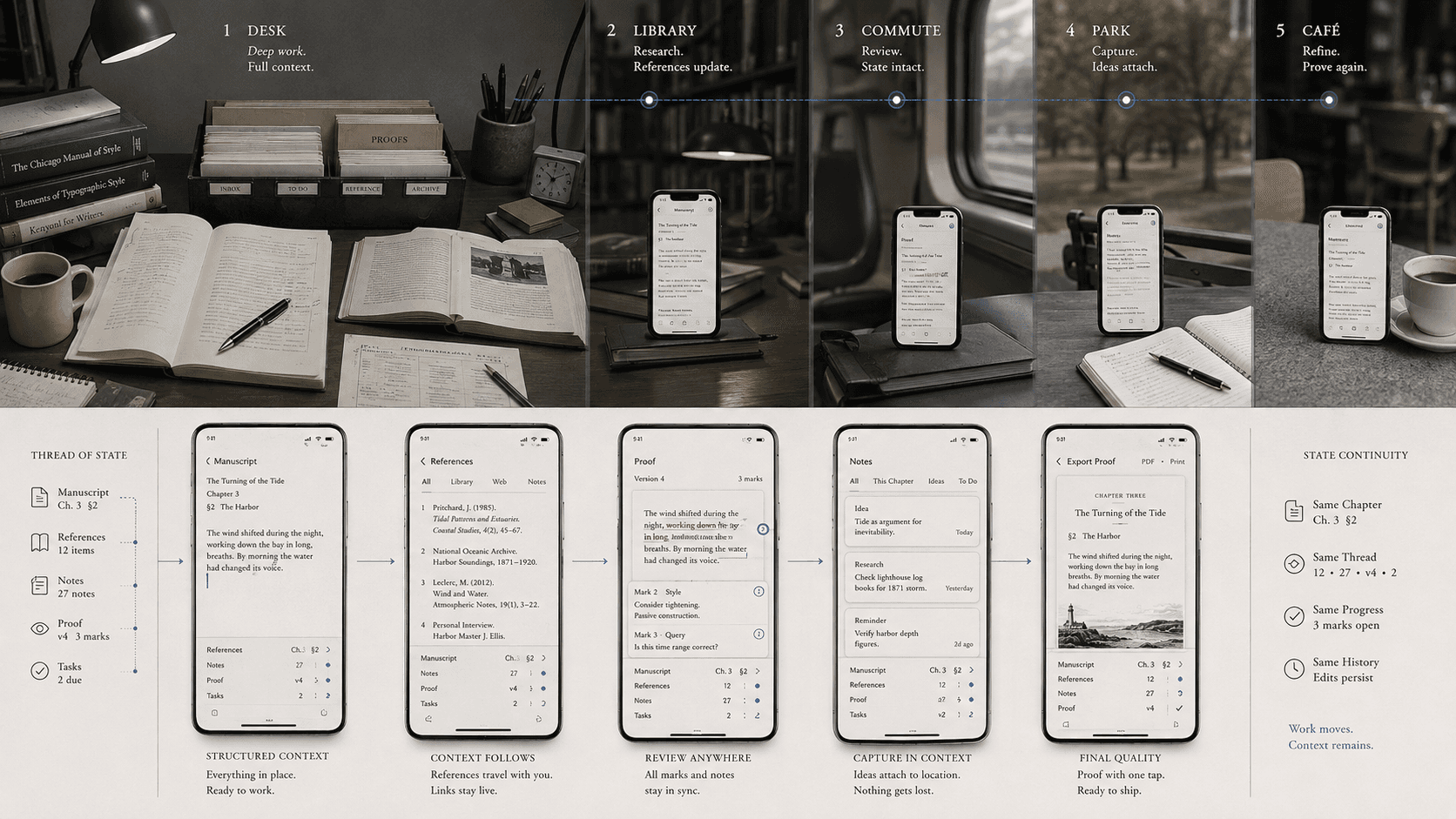
For much of personal computing history, “using the computer” described a destination. A person sat at a desk, faced a screen, reached for a keyboard and pointing device, and entered a session. Files, reference material, cables, power, paper, and other tools gathered around the place. Leaving the computer could also mean leaving the work.
The graphical desktop made this spatial arrangement into an interface. Xerox's Star system presented documents, folders, trays, and printers as objects on an electronic work surface. The metaphor helped office workers manipulate information by borrowing the place in which that information had been handled.
A smartphone unsettles both desktops. Professional work can occur while the person is between places, and the interface can no longer assume that a large visible surface will hold the project's context. The interesting design problem is larger than fitting desktop controls onto a small screen. The place used to supply things the tool must now supply deliberately.
Context was furniture
A desk externalizes state. An open notebook marks one line of inquiry. A stack of proofs waits for comparison. A second screen keeps sources visible beside a manuscript. A closed door or pair of headphones may signal a period of concentration. The arrangement can be inefficient and still give the worker a spatial memory of what is in progress.
Desktop software inherited some of this staging. Windows remain visible together. File paths and folders expose a project hierarchy. Menus stay in predictable positions. Keyboard shortcuts assume both hands and practiced muscle memory. A long session lets the user reconstruct context once and retain it.
None of these conditions is guaranteed at a physical desk, and many desks are distracting. Their contribution is possibility: surface, simultaneous view, stable input, peripheral devices, power, and a ritual of arrival. Professional tools quietly relied on this infrastructure while attributing all capability to the software.
Mobility changes the session
Mobile work is often organized into shorter, interrupted encounters. The user may check a proof on a train, correct metadata between appointments, capture a paragraph in a waiting room, or approve a cover from another workplace. Consequence is not proportional to session length. A thirty-second correction can alter every copy of a book.
Field research helps separate capabilities from slogans. A 2009 study of sixteen information workers found that smartphone and PC use balanced mobility and convenience against input and readability; within-task transitions between devices were limited in that sample. The finding belongs to its time, when devices and services were different. Its continuing value is the question of handoff: can work change context without losing state?
A later study of remote information workers found mobile devices supported flexible, short activities while complicating boundaries between work and nonwork. Portability gives access to a task wherever the device goes. It can also remove the physical act that once ended the workday.
These studies do not establish how professional publishing should be done now. They reveal recurring conditions that hardware improvement does not remove: changing attention, limited simultaneous view, input constraints, state transfer, and the erasure of spatial boundaries.
Context and comparison
A mobile tool has to show enough project state for a user to understand what they are changing. A title alone may not distinguish editions. A paragraph opened without chapter, comments, or revision state can invite the wrong edit.
Publishing also requires comparison: source and proof, text and note, image and caption, current and prior version. A small screen cannot display everything legibly at once. The interface needs fast, trustworthy movement between views and a clear indication of what remains held. An outline, named split state, or explicit return point can preserve relationships that a broad desk once left visible.
This is a design problem of context recovery rather than raw screen area. A large display can show several wrong versions at once. A small display can support a controlled comparison if it states which edition, region, and source the user is viewing and makes switching predictable.
Precision and consequence
Touch supports direct manipulation and rapid selection while making tiny targets, long-range text selection, and exact cursor placement difficult under some conditions. Good mobile design changes target size, gesture, zoom, and task sequence instead of reproducing a dense toolbar.
The interface should match friction to consequence. Correcting one word needs a generous text surface, precise selection, nearby history, and a reversible commit. Restructuring a chapter may need an outline rather than a tiny continuous page. Reviewing an EPUB may need a checklist and links to representative views rather than a shrunken simulator of every device.
Before overwriting a final file, changing an ISBN, or generating a distribution package, the interface should surface scope and ask for appropriate confirmation. A pause can be protective. Friction belongs where the action is difficult to reverse, not where a user is merely trying to place a cursor.
Progressive disclosure helps when it follows the task. A phone does not have room to show every typography control beside every metadata field. It can show the current decision, preserve a path to advanced settings, and keep important state visible. Hiding complexity is useful only when the user can inspect what the system decided.
Continuity, custody, and boundaries
An interruption should not erase the user's place, unsent change, selected range, or understanding of what has synchronized. Resuming is an editorial operation: restore the right document, location, mode, and surrounding evidence. When work moves among devices, the system must also preserve identity. A note may begin on a phone, become a chapter on a larger screen, return as a proof for mobile review, and leave as a production export.
Handoff fails when “the same document” refers to two unsynchronized copies, comments disappear in export, a mobile edit changes an old edition, or the user cannot tell whether work is offline. Cloud synchronization can solve remarkable continuity problems and create ambiguity about authority. Status should show which state is current, which changes are local or shared, and what an export will contain.
Professional work also requires custody. App-based storage can make saving effortless and exit obscure. The user needs to know where an authoritative state is stored, who can reach it, what history is retained, and how to take the work elsewhere in a documented form.
A device carried everywhere needs boundaries as well. Accounts, notifications, deferred work, and consequential actions should be separable enough for a person to end a session. An office door once performed some of this badly but visibly. Mobile software has to make the boundary legible without assuming one correct work style.
Capabilities the desk did not supply
Mobile devices add more than portability. Cameras capture source material. Microphones support dictation and notes. Connectivity enables collaboration and retrieval. Location and sensors can matter in field research. Touch can make direct reordering or annotation fluid. Professional design should use these powers selectively rather than treating the phone as an underqualified laptop.
Some tasks still benefit substantially from large displays, calibrated color, keyboards, storage access, or quiet sustained attention. A phone does not need to defeat those conditions to become a professional tool. It needs to let appropriate work be done with professional control when location, equipment, or time differs.
That distinction matters to Wexley Pro's publishing philosophy. The relevant ambition is not to declare the desk obsolete or count how many desktop controls fit on glass. It is to identify which publishing operations were bound to a place by necessity and which were bound there by inherited interface design. Where location is removable, context, continuity, precision, custody, and exit have to remain.
The computer stops being a place when the work no longer begins by arriving at one. The session still needs a beginning, a recoverable middle, and a trustworthy end. Those are now properties of the publishing interface.
SOURCES
- Xerox. Office Systems Technology (1982). https://bitsavers.computerhistory.org/pdf/xerox/sdd/OSD-R8203_Xerox_Office_Systems_Technology_Nov82.pdf - Computer History Museum. “Xerox Star Runs One More Time.” https://computerhistory.org/events/xerox-star-runs-one-more/ - Karlson, Amy K., et al. “Working Overtime: Patterns of Smartphone and PC Usage in the Day of an Information Worker.” https://www.microsoft.com/en-us/research/wp-content/uploads/2009/05/Pervasive09_Patterns_final.pdf - Microsoft Research. “Two Birds with One Phone: The Role of Mobile Use in the Daily Practices of Remote Information Work.” https://www.microsoft.com/en-us/research/publication/two-birds-with-one-phone-the-role-of-mobile-use-in-the-daily-practices-of-remote-information-work/ - Karlson, Amy K., et al. Smartphone taskflow field study. https://www.microsoft.com/en-us/research/wp-content/uploads/2010/01/p2009-karlson.pdf