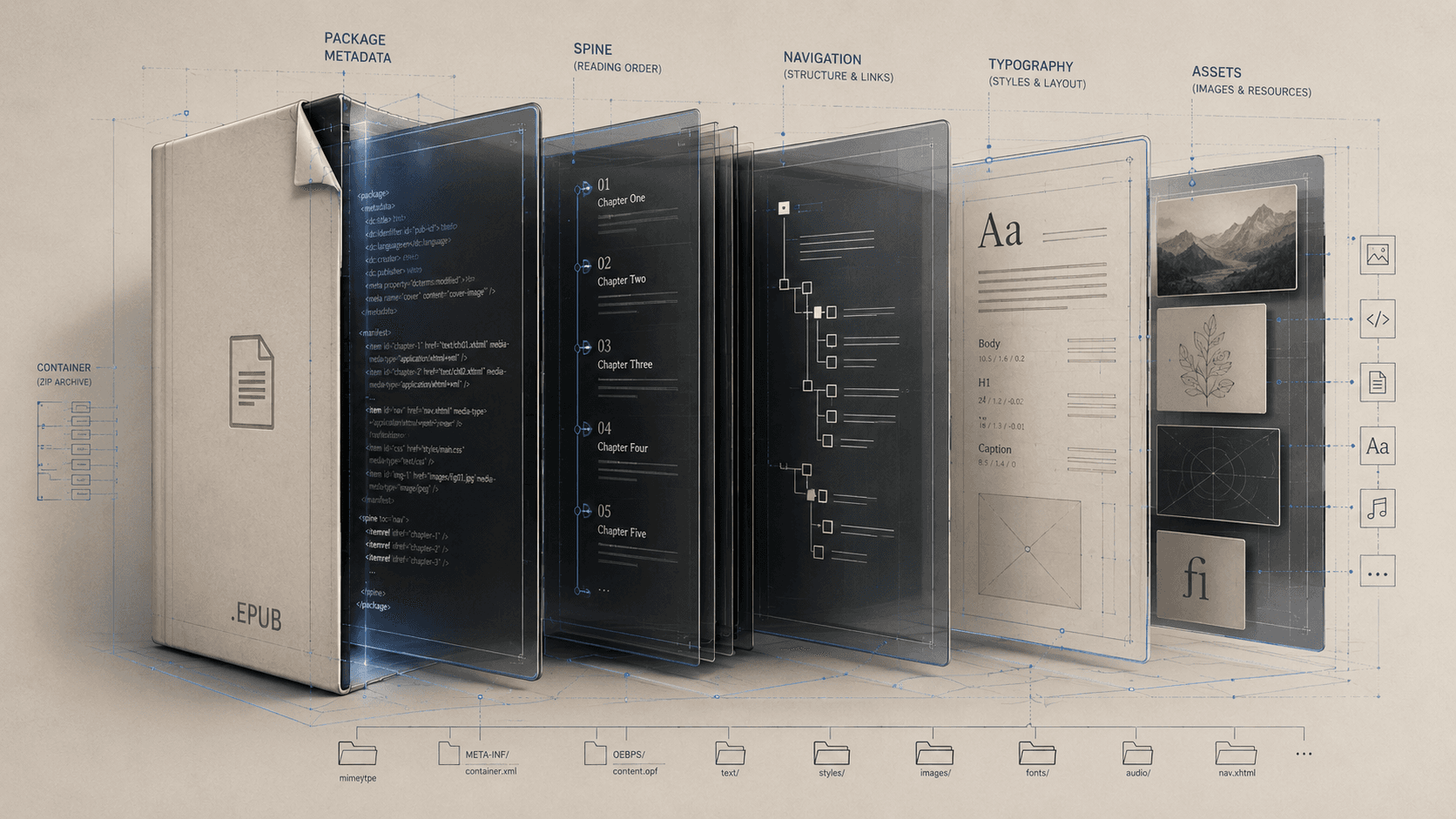
An EPUB arrives as one file. That appearance is convenient and slightly deceptive. The file is a container holding a set of documents, styles, images, fonts, metadata, and instructions whose relationships make them a publication. No single piece inside is “the book” in the way a word-processing document seems to be.
It is common to explain this by saying that an EPUB is a website inside a ZIP archive. The comparison is useful because EPUB relies on HTML, CSS, SVG, and other web technologies. It also omits the part that matters most. An arbitrary zipped website has no required publication identity, default reading sequence, manifest of resources, or machine-readable table of contents. EPUB adds that contract.
Suppose the file opens directly at chapter seven even though every chapter document is present and correctly named. The symptom is visible at the surface; its cause may live in a package file most readers never see. Following that discovery path is the easiest way to understand what the apparent single file contains.
The label on the container
At the root of an EPUB is a small file named `mimetype`. Its content identifies the archive as an EPUB, and the specification places exact requirements on how it is stored. The file extension helps people and operating systems, but this internal label is part of the format's own identification.
The reading system then looks in `META-INF/container.xml`. This is a directory rather than the book's catalog: it points to the package document that describes the publication. Most EPUBs encountered by ordinary readers have one package document, although the container model can support more than one rendition.
These opening steps seem bureaucratic until they fail. A collection of valid HTML chapters can be unreadable as an EPUB if the reading system cannot discover the package that tells it what the collection is.
The package: identity, inventory, order
The package document distributes three major responsibilities among its sections.
Metadata identifies and describes the publication. It includes a title, language, and identifier, along with other information a producer may supply about contributors, dates, accessibility, and rendition. This is metadata inside the EPUB. A retailer, library, or distributor may keep a separate record, and the two can disagree. Correct metadata cannot be inferred from a correct cover image.
The manifest is an inventory. Each content document, image, stylesheet, font, navigation document, and other publication resource that belongs to the package is declared there. A manifest entry says, in effect, that this resource is part of the publication and gives the information needed to process it. The manifest does not say when a reader should encounter every item.
The spine supplies that sequence through an ordered list of references to manifest items. If chapter seven appears before chapter six there, the book can contain correctly named files and still proceed in the wrong order. Alphabetical filenames may happen to match reading order; they are not the authority.
This separation is a recurring EPUB lesson. Membership and order are different facts. A cover image belongs to the publication without being a chapter. A stylesheet acts on the book without appearing in the reading sequence. A note section may be available through links while occupying a different position in the spine.
The documents a reader encounters
The chapters are usually EPUB XHTML content documents. They contain headings, paragraphs, quotations, lists, links, figures, notes, and other structures recognizable from the web. SVG can serve as an image within a chapter or, in defined cases, as a content document. CSS controls presentation: type, spacing, alignment, margins, image sizing, and many other defaults.
“Defaults” deserves emphasis. A reflowable EPUB is interpreted by a reading system under conditions the publisher does not fully control. The application may provide its own styles, the reader may enlarge the text, and the device may rotate. Support for optional features varies. EPUB production therefore involves authored presentation and disciplined surrender. The book must remain intelligible when some visual preferences change.
Structure and style can look identical in a screenshot while behaving very differently. A line enlarged and bolded to resemble a heading is not necessarily a heading. A run of spaces may appear to indent a quotation but conveys no reason for the indentation. When content is correctly identified, reading systems and assistive technologies have something stable to interpret even as its appearance changes.
The map is its own document
Every conforming EPUB 3 publication includes one navigation document, and that document contains one required table-of-contents navigation element. It is written in XHTML, but it has a publication-level role. A reading system can use it to populate a navigation panel whether or not the document also appears as an ordinary page in the spine.
The table of contents should follow the spine's order and point to meaningful destinations. Optional navigation can identify major landmarks, such as the body matter or bibliography, and can map page breaks from a print source when page navigation is relevant. These are different maps. A table of contents describes the conceptual outline; landmarks expose major regions; a page list preserves another edition's address system.
EPUB 2 used an NCX file for navigation. EPUB 3 replaced that mechanism with the XHTML navigation document, though producers may include an NCX for deliberately supported older reading systems. It is a legacy bridge rather than the current source of EPUB 3 navigation.
The navigation document also reveals why an automatically generated contents list can be wrong. Software can collect headings and produce valid links. It cannot decide whether the wording is useful, whether six levels overwhelm the reader, or whether a section omitted from the outline is essential to finding one's way.
Assets and their obligations
Images, fonts, audio, and other resources are not loose attachments. They must be declared, addressed, and used in supported ways. An image can be present in the archive and absent from the page because its path is wrong. It can display perfectly and remain inaccessible because its purpose has no useful text alternative. A font can be packaged correctly and still depend on rights the publisher does not possess.
A figure needs a relationship to its caption and prose. A note needs a reference, destination, and usable way back. A stylesheet needs selectors that correspond to real structures. A title in metadata needs to match the publication being delivered, not an earlier project name. Inspecting the archive confirms that components exist; reading and testing show whether the connections make sense.
The last component is outside the file
A reading system completes the rendition. EPUB 3.3 specifies many processing responsibilities, but it does not require every application to implement every possible feature or present each one identically. The same conforming EPUB can therefore have different line breaks, controls, note treatments, and minor styling across devices.
That variability is sometimes described as EPUB unreliability. A better distinction is between intended variation and defects. Different pagination under different font settings is intended. A heading clipped because of brittle CSS is a defect. A note displayed in a panel by one app and at the end by another may be a supported variation. A note link that leads nowhere is a publication failure.
EPUBCheck can test a large and valuable set of conformance rules: package declarations, references, markup, media types, and other machine-checkable requirements. Passing does not mean that chapter order makes sense, alternative text communicates, metadata is true, or typography survives actual reading environments. Those require people to read and test.
The file icon conceals a compact publishing system. Package, spine, navigation, content, styles, assets, and reading software divide the authority that a single document appears to hold. Distribution makes the EPUB singular; the book inside remains an agreement among parts.
SOURCES
- W3C. EPUB 3.3. https://www.w3.org/TR/epub-33/ - W3C. EPUB 3.3 Reading Systems. https://www.w3.org/TR/epub-rs-33/ - W3C. EPUB Accessibility 1.1. https://www.w3.org/TR/epub-a11y-11/ - W3C. EPUBCheck repository. https://github.com/w3c/epubcheck - DAISY Consortium. “Validation Overview.” https://kb.daisy.org/publishing/docs/epub/validation/overview.html - Library of Congress. “EPUB 3.” https://www.loc.gov/preservation/digital/formats/fdd/fdd000310.shtml