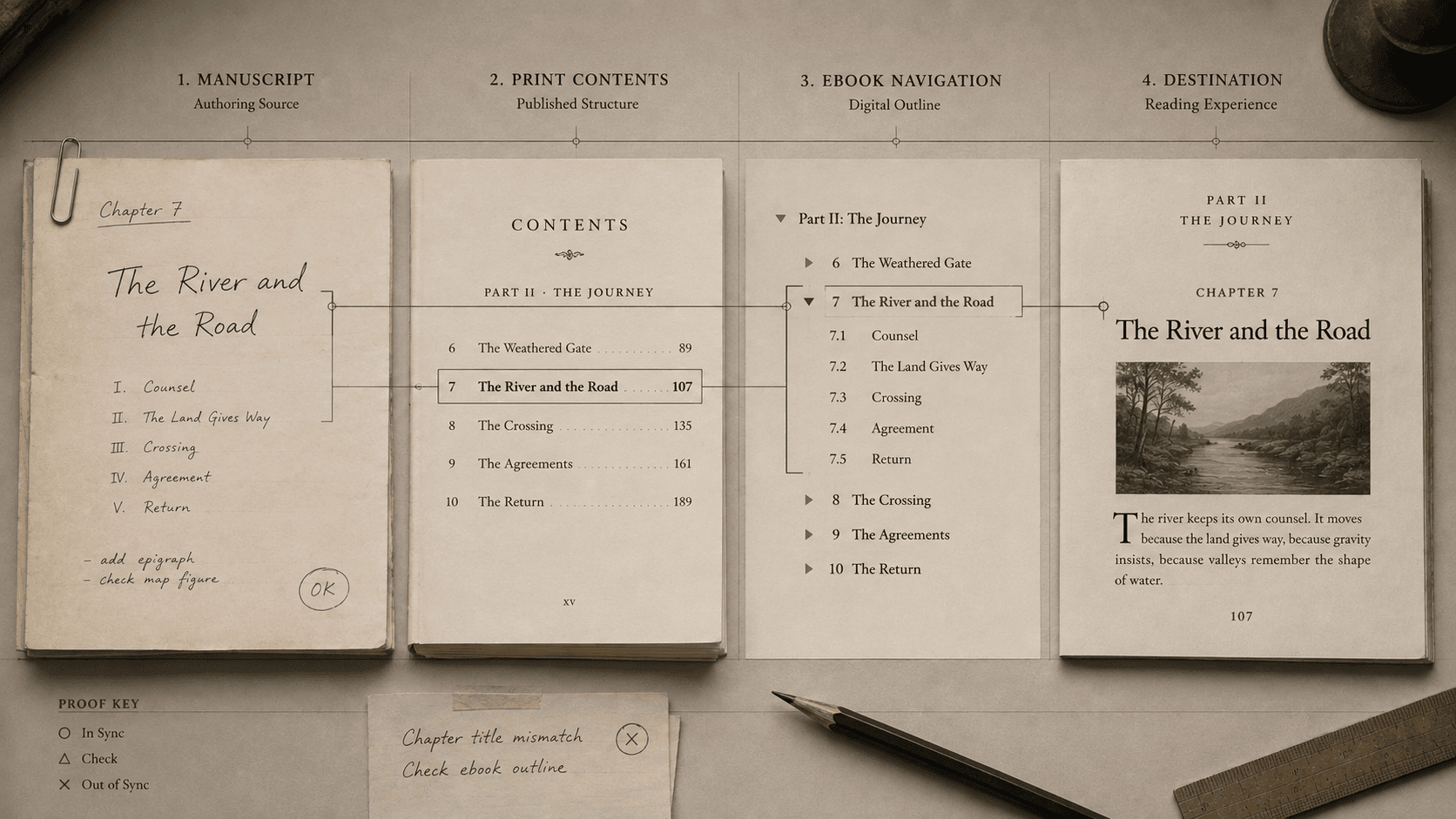
Late in production, an author changes “The City at Night” to “After the Last Train.” The chapter heading is corrected. The printed contents page was generated yesterday and still carries the old title. The ebook navigation points to the right chapter under the wrong label. A running head uses a shortened version, and external metadata repeats an earlier phrase.
There is only one chapter, but its title has acquired several lives.
A table of contents appears to be a list. In a produced book, it is a synchronization system joining editorial structure, visible wording, order, destinations, and machine-readable navigation. Software can generate the list. It cannot decide whether the several representations still describe the same book.
The title in the manuscript
The first life belongs to the author and editor. A heading divides the argument or narrative, gives a section a name, and establishes its level among neighboring parts. The words can be lyrical, descriptive, numbered, or deliberately absent. The structural fact remains: this is a division of a certain kind.
Appearance can conceal that fact. A writer may enlarge and bold a line without marking it as a heading. It looks right on the screen, yet a production system sees an ordinary paragraph with unusual styling. Another writer may apply a heading style merely to make text large, placing an epigraph or dedication inside the document outline. Automatic contents generation faithfully reproduces both mistakes.
Semantic heading levels should describe relationships rather than desired size. A chapter and its subsections need a coherent hierarchy even if the final design gives them surprising visual treatments. This structure supports contents generation, heading navigation, conversion, and editorial inspection. It is also an argument about the book: what belongs under what?
The title in the print list
A printed contents page selects from that hierarchy. It rarely needs to expose every heading. A short work may list only chapters; a reference book may benefit from several levels; a scholarly work may include parts, chapters, and named apparatus. Genre and house conventions guide the choice, but there is no universal correct depth.
The wording may reproduce the display heading exactly or use an editorially controlled shorter form. Either can work if the relationship remains clear. Problems arise when abbreviation is accidental, numbering drifts, or a late revision reaches only one surface.
Print adds page addresses. These must be checked after the composition is sufficiently stable, because changing type or inserting material can move every later entry. Automated pagination reduces transcription error. It does not know whether an entry should be present, whether its label is intelligible, or whether a blank page has shifted a section to the intended recto.
A useful print review ignores beauty for a moment. Read the entries as an outline. Do their levels express the book? Do labels match the headings by policy? Is the order complete? Then follow a sample of page numbers in each region, including the first and last entries and anything that moved late. The contents page is simultaneously editorial outline and mechanical index; both need approval.
The title in EPUB navigation
A conforming EPUB 3 publication includes a navigation document containing a table-of-contents navigation element. Reading systems can use it to build their own navigation panel. The navigation document may also appear as an ordinary page in the book if it is included in the spine, but it does not have to. The map can operate even when readers never encounter it in the main sequence.
This distinction surprises producers who have made a clickable contents page and assume the job is finished. A set of visible links is not automatically the publication's required machine-readable navigation. Conversely, an EPUB can have working app navigation without displaying a conventional contents page in the text.
The navigation order should correspond to the spine, which establishes the publication's default reading order. Links targeting multiple sections inside one content document should follow their order in that document. Each destination should land where the named material meaningfully begins.
The result is a small set of relationships that can fail independently:
- The label can be wrong while the link is right.
- The label can be right while the destination is wrong.
- Every link can work while the order is wrong.
- The order can match the spine while the spine itself is wrong.
- The visible chapter can be correctly styled while its source structure is not a heading.
Validation catches many malformed relationships. It cannot determine that “After the Last Train” is the new approved title or that a link landing halfway through its opening paragraph is editorially careless.
Three maps, not one
EPUB can carry other navigation alongside the table of contents. Landmarks identify major regions such as title page, body matter, bibliography, or index. A page list can map page-break locations when the digital publication corresponds to a print source and page navigation matters. These are distinct maps.
The table of contents represents the conceptual outline. Landmarks offer fast entry to major functional regions. A page list preserves an edition's page-address system. A reader may need one, two, or all three depending on the work. Only the table-of-contents navigation is universally required by EPUB 3; the others should be added when they serve a real purpose and are correctly implemented.
The older EPUB 2 system used an NCX file for navigation. EPUB 3 replaced it with the XHTML navigation document, though an NCX may be included for intentionally supported legacy reading systems. Calling both “the TOC” hides a standards transition and makes troubleshooting harder. The producer should know which artifact is authoritative for the publication being made.
The title as spoken and reached
A navigation label is interface copy. It may be read aloud, scanned in a narrow panel, displayed without the surrounding page design, or encountered by someone who cannot see the chapter's ornamental number. “Chapter Three” may be sufficient in a sequential novel and useless in a technical manual with descriptive titles. Repeating “link” or “go to” inside every label adds noise because the interface already communicates the control's role.
Destination quality is equally editorial. A link that lands before a decorative image may force a reader to move through unexplained material before reaching the heading. A link that lands after the heading can remove the title from context. Reading-system presentation varies, but the publication can still provide a stable, meaningful target and test it in representative environments.
Headings offer a second navigation path inside content. A reader using assistive technology may move by publication navigation to a chapter and then by headings through its sections. That path depends on accurate hierarchy within each document, not merely a polished global contents list.
A human synchronization pass
The most efficient review follows one label through the system, then samples enough others to expose patterns.
Begin with the approved editorial outline. Compare each selected entry with the actual display heading. Confirm level and order. For print, verify final page addresses after composition. For EPUB, inspect the spine and navigation source, then activate every link. Read labels outside the page design and check that each destination provides context. Inspect heading structure within the chapter. If landmarks or a page list are present, test their separate promises.
Late changes need a named propagation path. A title change should reach the chapter heading, editorial outline, print contents, relevant running furniture, EPUB navigation, accessible labels, and repeated external metadata. Relying on memory is how one chapter becomes several titles.
A table of contents earns little attention when it works because its labor disappears into arrival. A reader sees a phrase, understands the book's shape, chooses a destination, and reaches it. The visible list succeeds when the several documents behind it agree.
SOURCES
- W3C. EPUB 3.3. https://www.w3.org/TR/epub-33/ - W3C. EPUB Accessibility 1.1. https://www.w3.org/TR/epub-a11y-11/ - W3C. EPUB Accessibility Techniques 1.1. https://www.w3.org/TR/epub-a11y-tech-11/ - DAISY Consortium. EPUB publishing knowledge base. https://kb.daisy.org/publishing/