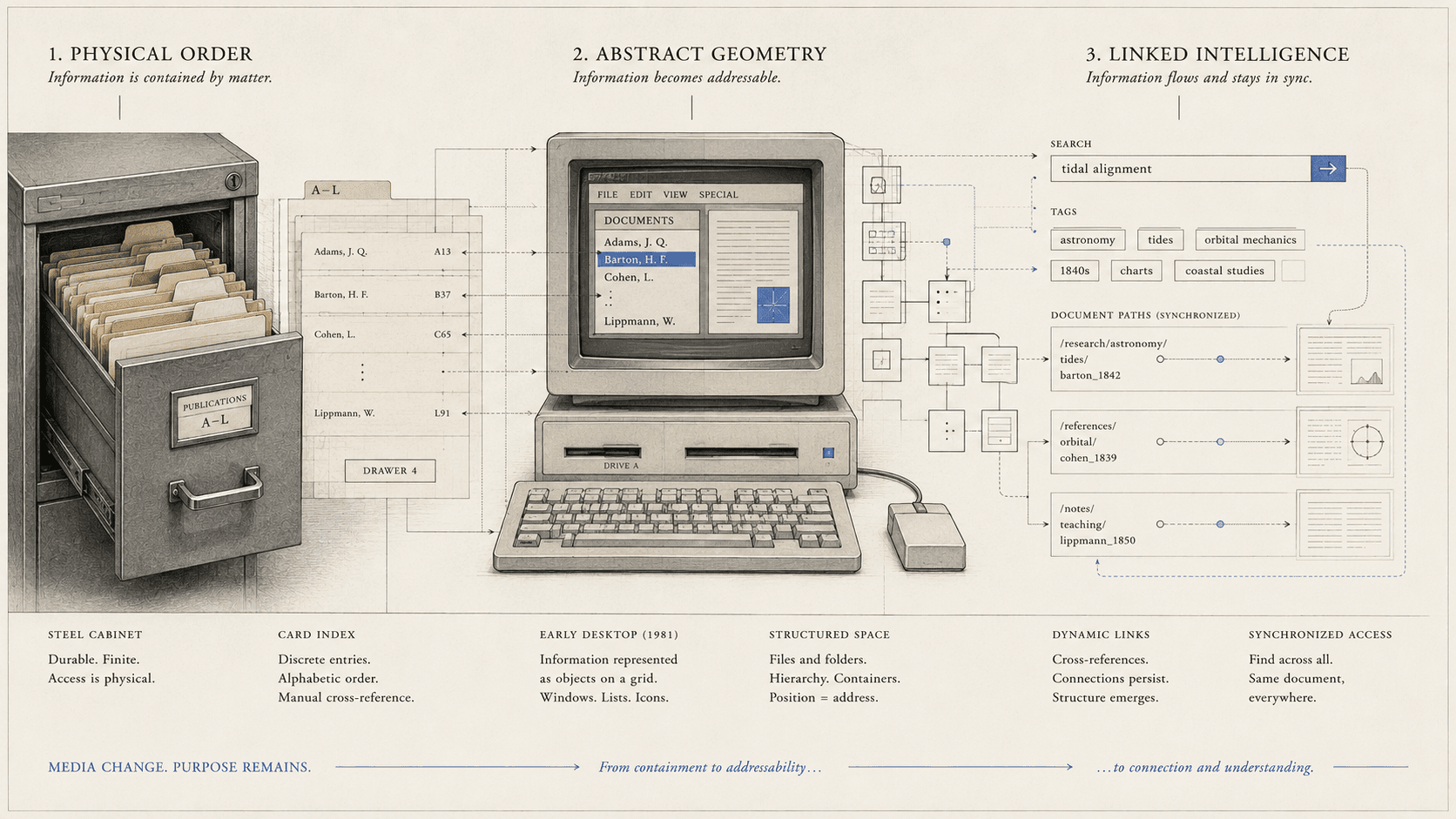
Putting a document in a folder feels less like a metaphor than a fact. The document was here; now it is there. The folder contains it. Another folder cannot contain the same file unless we move, copy, link, or synchronize it.
None of these properties belongs naturally to information. They belong to a useful arrangement of storage concepts and visible objects. The arrangement became ordinary enough that its history disappeared behind the instruction “Save as.”
To recover that history, three things have to be kept separate: the physical office filing system, the computer file as a storage abstraction, and the graphical folder presented to a user. They intersect. They are not one invention. This is an account of the cabinet's inherited logic in interface design, not a full social history of paper filing.
The office enters the screen
The Xerox Star, introduced in 1981, described its interface as an electronic desktop. Documents appeared as visible icons among folders, file drawers, in/out baskets, printers, and other office services. Users selected and moved objects with a mouse rather than expressing every operation through a command language.
This was a deliberate translation. Xerox's design papers identify the physical office as the principal metaphor and describe concrete, recognizable objects for professional users who were not expected to be programmers. A document could be moved into a file drawer or onto a printer because those destinations were already intelligible in the intended workplace.
The metaphor did more than decorate hidden machinery. It established a model of action. An icon represented a manipulable object with properties. Movement across the screen represented an operation on stored information. The desktop made abstract processes visible enough to point at.
Star did not invent every element of graphical computing or the underlying idea of a computer file. Research systems and earlier interfaces supplied other parts of the history, and later products developed them differently. The important point is documented intent: office objects were chosen to teach users what kind of world the computer contained.
A file is not an icon
Computers had named units of stored data before graphical folders made them look like sheets of paper in containers. A file system organizes data and supports operations such as naming, reading, writing, and locating. Its implementation does not require a picture of a manila folder.
The graphical interface adds a model of visible objects. It tells the person that this item is a document, this container holds documents, and this motion changes their relation. The visible hierarchy can correspond to paths in storage, but it does not have to reveal every underlying structure. System files can be hidden. One displayed object can aggregate several resources. A shortcut can appear in one folder while pointing elsewhere.
Confusing layers creates familiar puzzles. Copying an icon may duplicate data, create a reference, or initiate a synchronized replica depending on the system. Deleting an icon may remove the underlying item, remove one view, or move it to a recoverable holding area. The picture remains familiar while the operation changes beneath it.
Interface abstraction lets a user organize a manuscript without understanding blocks, indexes, or network protocols. The system must still communicate whether an action moved the only copy, created another one, or changed who can reach it.
What the folder teaches
A folder answers “where?” It gives a document one visible home in a hierarchy. The user can browse from broad container to narrow container, name the path, and transfer the enclosing folder as a unit. Permissions and retention policies can follow the boundary. For projects with a known structure, the model remains powerful.
The same model carries assumptions from physical custody. One principal location appears natural. Classification must often choose a parent: is an essay filed under its author, subject, publication, or year? A paper office can create cross-references and duplicate copies, but each carrier still occupies a physical place.
Digital information can support several access paths without duplicating the underlying content. A document can appear in search results, a tag collection, a recent-items list, a project view, and links from other records. These answer different questions. Search asks what contains a term. Tags ask in which declared categories an item participates. Links ask what relates to it. The folder asks where custody has placed it.
No one mechanism replaces the others. Search fails when the remembered word is wrong. Tags require maintenance and shared vocabulary. A graph of relationships can obscure which version is authoritative. Hierarchy provides scope and predictable transfer even when it feels restrictive.
The designers knew metaphor had limits
Retrospective accounts by Xerox Star designers do not present metaphor as a perfect law. Familiar office objects helped people learn, while some operations were slower through pointing than through typed input. A metaphor can make one action obvious and another cumbersome because the source world does not contain the computer's full capacity.
A paper folder cannot show every document mentioning a phrase instantly. A digital folder can, but search is conceptually outside the container. A physical document cannot exist as one live object on several desks at once. A synchronized digital document can appear that way, while conflict and custody become harder to see.
The design task is to borrow enough structure that people can predict consequences, then reveal where the system's powers and risks depart from the borrowing.
When location disappears
Mobile and cloud-based applications often weaken the visible hierarchy. A user opens a recent document, taps a project card, or searches an account. Saving may happen continuously. The file path is absent. The work feels located inside the app.
This can remove tedious file management and support continuity across devices. The document has not escaped location; its location has become distributed among local cache, service database, account identity, synchronization state, and exported files. The interface has chosen not to show that structure continuously.
“Save” changes meaning in this environment. It may mean commit a named file to storage, confirm a database record, wait for synchronization, or do nothing because every edit is already stored. “Move” may reorganize only a view. “Own” can refer to authorship while custody and access depend on a provider.
Database-backed documents can offer collaboration, version history, search, and recovery that a local folder lacks. The design obligation is to make continuity and exit legible. A user should be able to tell whether work is stored, synchronized, shared, recoverable, and exportable without learning the backend architecture.
A vocabulary for choosing
The file-and-folder metaphor survives because it gives strong answers to several needs: named units, visible containment, scope, transfer, and local custody. It becomes strained when the important relation is many-to-many, when one live object appears across contexts, or when service state matters more than a path.
Interfaces can choose among several questions:
- Where does this item live?
- What project or subject is it part of?
- What other items refer to it?
- Who can access or change it?
- Which copy or state is authoritative?
- How can the user take it elsewhere?
Folders answer the first elegantly and can support some of the rest. Search, tags, databases, permissions, histories, and export mechanisms answer others. An interface does not have to abolish the cabinet; it has to avoid asking the cabinet to explain the entire building.
The electronic folder once made invisible information concrete. As computing moves into accounts and synchronized services, the next challenge is nearly reversed: make invisible custody concrete enough that people can trust where their work has gone.
SOURCES
- Computer History Museum. “Xerox Star Runs One More Time.” https://computerhistory.org/events/xerox-star-runs-one-more/ - Xerox. Office Systems Technology (1982). https://bitsavers.computerhistory.org/pdf/xerox/sdd/OSD-R8203_Xerox_Office_Systems_Technology_Nov82.pdf - Computer History Museum. Xerox Star final demonstration transcript. https://archive.computerhistory.org/resources/access/text/2015/09/102737965-05-01-acc.pdf - Xerox. Star Release 1 Product Software Functional Specification. https://bitsavers.computerhistory.org/pdf/xerox/star/STAR_Release_1_Product_Software_Functional_Specification_Ver_5.3_198115.pdf - Smith, David C., et al. “Designing the Star User Interface,” retrospective. https://www.digibarn.com/friends/curbow/star/retrospect/ - Library of Congress. “Sustainability Factors.” https://www.loc.gov/preservation/digital/formats/sustain/sustain.shtml