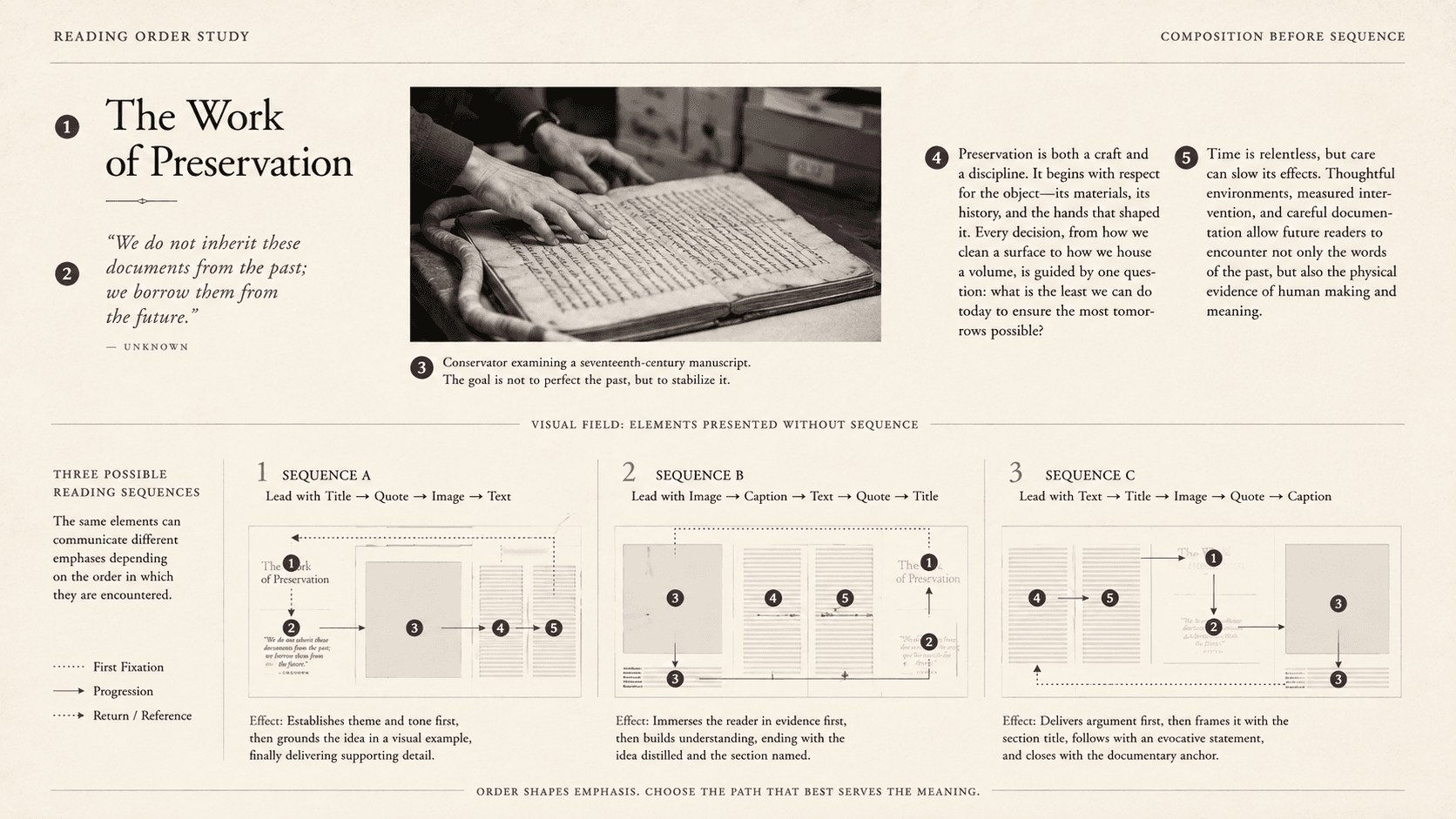
A two-page spread contains a title across the top, a photograph on the left, a quotation laid over the photograph, two columns of prose on the right, and a caption at the bottom. A sighted reader can take in the field, infer that the quotation belongs to the person pictured, and choose where to begin.
Turn the spread into a sequence and several plausible books appear. Title, quotation, photograph description, caption, first column, second column. Or title, first column, photograph, quotation, caption, second column. The visual design made relationships available at once, which allowed the underlying editorial order to remain undecided.
Every digital publication eventually meets an interface that cannot present the whole field simultaneously: speech, braille, copy and paste, a narrow viewport, search extraction, or a text-only transformation. The sequence exposed there is part of what the book says and should be decided during editorial production, early enough for design and markup to express it.
Order at the scale of the book
An EPUB package contains a manifest and a spine. The manifest inventories resources. The spine orders the content documents that form the default reading sequence. They answer different questions: what belongs to the publication, and in which sequence should its principal content be encountered?
If the spine places chapter four before chapter three, valid chapter files can produce an incoherent book. Filenames do not settle the matter. A file named `chapter-03.xhtml` can appear anywhere in the spine, and a reading system follows the package's declared order.
Spine items can be marked non-linear, identifying material outside the primary sequence. A reading system may still expose it. Non-linear is therefore not a hiding place for content the editor has not integrated. A map, answer key, plate section, or supplementary note still needs clear navigation and a meaningful relation to the main work.
The spine answers one question: which content document follows which? It cannot order the elements inside each document.
Order inside the page
EPUB chapters are commonly XHTML documents. Their source, represented as a document object model or DOM, has an order: heading, paragraph, figure, caption, link, next paragraph. CSS can place those elements elsewhere visually. A quotation stored after the article can be positioned beside the title. A caption can appear under an image regardless of where it occurs in source.
Visual coordinates do not rewrite semantic sequence. Assistive technologies and alternate presentations generally rely on programmatic structure and order, with behavior mediated by software. Keyboard focus adds another order for interactive elements. A design can therefore look correct while speech, focus, extraction, and linear reading encounter a different argument.
Calling this “screen-reader order” understates its reach and encourages teams to assign it to accessibility specialists. Source order also affects what happens when styling fails, text is selected, content is indexed, or a narrow screen simplifies a layout. It is publication order expressed beneath presentation.
For ordinary prose, the choice is straightforward: put elements in the sequence in which they make sense. Complex pages require editorial decisions. Should the caption precede the description? Does the quotation interrupt the paragraph it qualifies or follow the full section? If a diagram is introduced in prose, should its long description sit immediately after it or at another linked location? The right answer depends on meaning, but “whatever the design tool exported” is rarely an editorial answer.
Spread order
Fixed-layout EPUB preserves page coordinates and can combine pages into synthetic spreads. This does not remove the need for programmatic sequence. W3C guidance for fixed-layout accessibility emphasizes alignment between visual and DOM order and coherent progression across pages.
The problem becomes obvious when left-to-right assumptions are encoded carelessly. In a left-to-right book, the page sequence should proceed consistently through the publication, even if a spread view displays two pages at once. In a right-to-left publication, progression differs. Visual left and visual right do not supply a universal cultural reading order.
Within a fixed page, every text object placed at coordinates still needs a source position. Image-only pages need alternatives appropriate to their role. Zoom can make only part of the spread visible, which turns simultaneous composition into a navigation problem. Fixed layout preserves geometry and exposes the responsibility to translate that geometry for other modes.
The map must agree
The EPUB navigation document supplies another sequence. Its table of contents should follow spine order, and links targeting several locations inside one content document should follow the order of those targets. A reader may use the navigation panel without traversing preceding pages, so the map has to represent the book accurately.
Three layers can drift:
- The spine can put chapters in one order. - The navigation can list them in another. - Headings and elements inside a chapter can form a third.
All links may resolve. The package may validate. The book can still be wrong.
The same is true of page lists and landmarks. They add access paths without overriding the underlying sequence. A landmark pointing to body matter should reach the actual beginning of coherent body content. A page-list link should map the corresponding source page break, not merely a visually similar number.
Multiple paths still need a default
Some publications resist one reading route. Reference works invite lookup. Commentaries move between text and notes. Choose-your-path narratives branch. A visual essay may ask the reader to compare several objects without prescribing a first glance.
A default sequence does not deny these forms. It provides a usable traversal when an interface requires one. Alternative paths can be expressed through navigation, links, indexes, and explicit relationships. A branching narrative still has to say which choice follows which passage. A reference work still needs an ordered package, even if few readers consume it cover to cover.
The goal is not to imitate one sighted reader's eye movement. Visual readers scan differently, and a spread can support genuine simultaneity. The goal is to author a coherent linear interpretation and expose other meaningful relations where possible.
Reviewing a book without its design
Reading-order review is most effective when the visual layer is temporarily distrusted.
First, list spine items in order with plain labels. Include non-linear items and explain how readers reach them. Read the list as a book outline.
Second, inspect each content document's source or use a view that exposes structure. Follow headings, paragraphs, figures, captions, notes, and controls without relying on coordinates. For a complex page, write the intended sequence in ordinary language before adjusting markup.
Third, compare navigation with the spine and source. Activate links and confirm that destinations provide context. Review focus order wherever controls or interactive elements exist.
Fourth, test transformations. Enlarge text, narrow the viewport where reflow applies, navigate by headings, use keyboard controls, extract or copy text, and conduct nonvisual review with appropriate expertise. A single screenshot cannot provide this evidence.
Automated checks remain valuable. They can identify malformed markup, missing references, and many structural errors. They cannot determine that a quotation belongs after a particular paragraph or that a caption changes the interpretation of a photograph. Those are reading decisions.
Sequence is publication-scale syntax: preserving every part while scrambling their order changes what the book communicates. Reading order belongs wherever meaning is decided, early enough that design can express it, production can encode it, and review can challenge it.
SOURCES
- W3C. EPUB 3.3. https://www.w3.org/TR/epub-33/ - W3C. EPUB 3.3 Reading Systems. https://www.w3.org/TR/epub-rs-33/ - W3C. EPUB Accessibility 1.1. https://www.w3.org/TR/epub-a11y-11/ - W3C. EPUB Accessibility Techniques 1.1. https://www.w3.org/TR/epub-a11y-tech-11/ - W3C. EPUB Fixed Layout Accessibility. https://www.w3.org/TR/epub-fxl-a11y/ - W3C. Web Content Accessibility Guidelines 2.2. https://www.w3.org/TR/WCAG22/