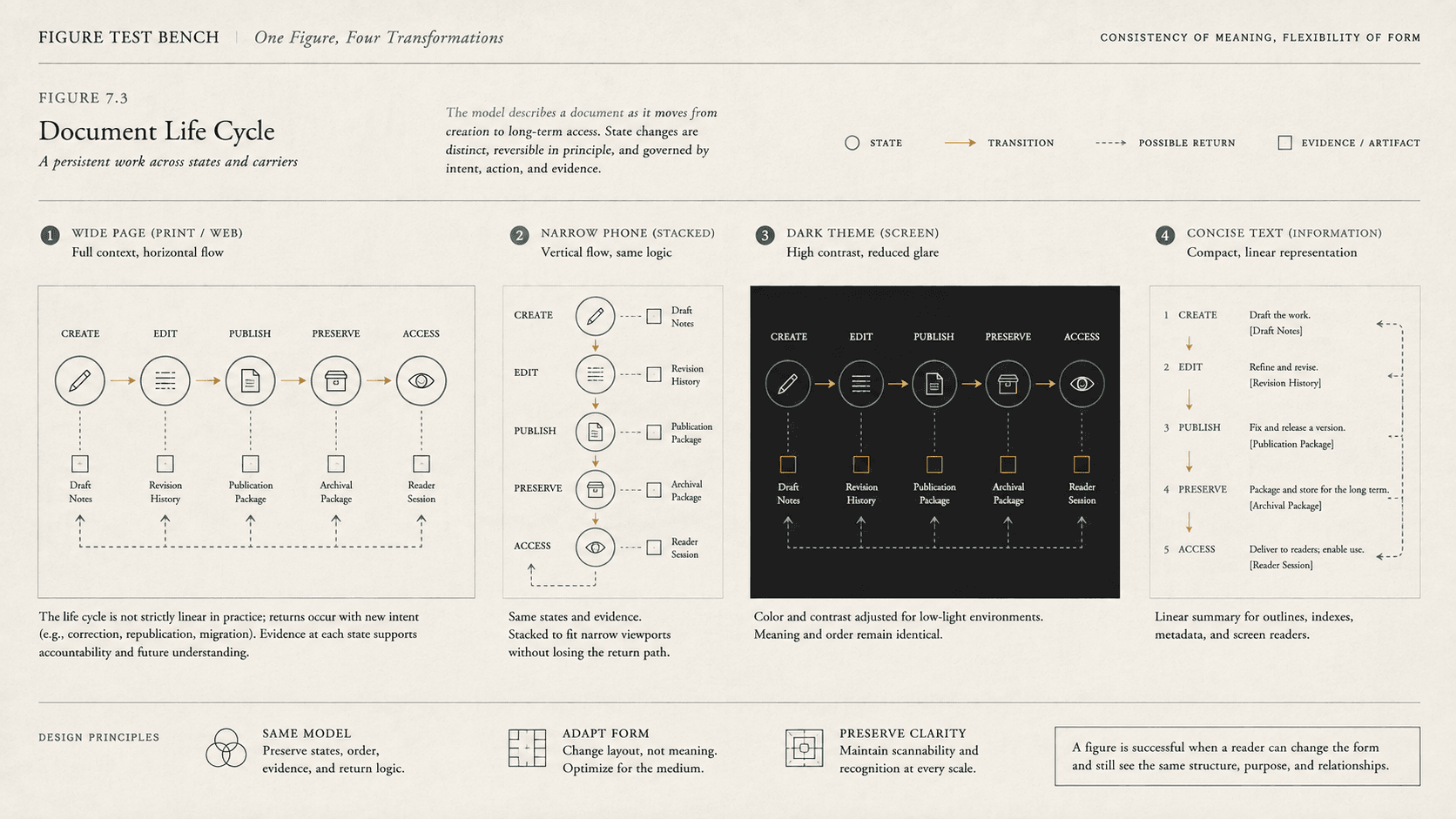
An image can look finished in an ebook preview and fail everywhere that matters. Enlarge the text and its caption moves two screens away; switch to a dark theme and thin transparent lines disappear. In a nonvisual reading, the alternative may say only “chart,” while on a narrow device the labels become smaller than the surrounding prose.
Pixel dimensions cannot solve these failures because they begin with meaning. An ebook image needs a file, size, and placement, but it also needs a defined job in the publication. The job determines its relationship to prose, caption, alternative text, reading order, and layout.
A useful production review begins by hiding the image and asking what disappeared.
Nothing essential disappeared
Some images establish mood, repeat a visual motif, or decorate a section break. If surrounding text already carries everything a reader needs, the image may be decorative in that context. Marking it with an empty text alternative allows assistive technology to skip it rather than announcing a meaningless filename or ornament.
“Decorative” is contextual. The same flourished rule can be irrelevant between chapters and meaningful when it marks a scene break that would otherwise vanish. A portrait may decorate an author page but identify a historical person in a textbook. The production team has to decide, not infer from file type.
Decorative images still need robust visual behavior. Transparent backgrounds should work with expected themes, and ornamental dividers should not become giant obstacles at large zoom. If the image communicates a structural break, that break should also exist programmatically or in text.
The prose already says it
An illustration can reinforce adjacent prose without adding unique information. Repeating the paragraph in alternative text burdens readers who encounter both. A concise alternative can identify the image's role, or the image may be decorative if the repetition is complete and no separate reference depends on it.
A caption is not automatically an alternative. Captions identify, credit, contextualize, or comment for everyone. Alternative text substitutes for the image's relevant function when the image cannot be perceived. They may share facts without having the same job.
“Portrait of Ada Lovelace, circa 1840” might serve as a caption. The alternative may need to communicate only that it is a formal painted portrait if the date and identity are already announced. If the article analyzes her pose or an object in the image, those details become part of the relevant alternative or prose.
The image carries one compact fact
An informative icon, photograph, or simple diagram can often be described briefly. The alternative should communicate the fact or function, not inventory every visible property. A warning icon needs the warning. A photograph documenting a cracked tablet needs the crack and its relevance. A button image needs the action it performs.
Write the alternative after answering why the editor put the image there, then test it in the sentence flow. If the prose becomes repetitive or the reference “as shown below” makes no sense, revise the whole relationship rather than polishing one attribute.
The image contains an argument
Charts, maps, technical diagrams, family trees, and infographics can contain more information than a short alternative should hold. W3C guidance for complex images recommends a concise identification plus a longer description supplied in surrounding content or at a clearly linked destination. A visible summary can benefit everyone.
The long form should serve the reading purpose. A chart used to establish a trend needs the trend, axes, notable comparisons, and access to underlying values when those values matter. A diagram used to teach a process needs components and relationships in meaningful order. A map used only to show relative position needs different detail from a map used for navigation.
Data tables can complement charts when exact values matter. They should not be added as ritual if the figure makes a qualitative point and the table would bury it. Nor should an enormous description be forced into an `alt` attribute. The short alternative can direct the reader to a full explanation that participates properly in the document.
SVG can keep lines and shapes sharp as they scale, but vector format does not make tiny labels readable or supply semantics. Text embedded as paths is no longer ordinary text. Complex SVG needs the same editorial account of purpose and access as a raster image.
The image contains text
Text baked into an image resists user choices. It cannot reliably reflow, may blur under magnification, may have poor contrast in alternate themes, and may not be available to search or assistive technology. WCAG advises using real text when the same visual presentation can be achieved without an image, with limited exceptions such as logos and cases where the representation is essential.
Book covers, facsimile pages, historical posters, comics, and diagrams can legitimately contain text as image. Their textual information still needs an accessible route: a transcription, alternative, long description, or equivalent structured content according to purpose.
For new figures, preserve editable source files and keep labels as real text where the workflow permits. Use enough contrast, line weight, and size for anticipated display. Avoid relying on color alone to distinguish series or states. A legend that says “green” and “red” fails if both become gray or cannot be differentiated by the reader.
The meaning depends on placement
Print prose can refer to “the figure opposite” because the composition fixes adjacency. Reflowable EPUB cannot guarantee a facing page or even that a figure remains on the same screen as the sentence introducing it. Refer to stable labels or content: “Figure 3” or “the map of coastal routes,” not “the image above.”
Place the figure near its first meaningful reference in source order. Keep figure and caption grouped semantically. Size it responsively so it does not overflow, while recognizing that fitting the viewport can make dense content illegible. For complex material, give readers a way to enlarge, inspect, or reach an alternate representation.
Dark-mode behavior varies among reading systems. Some leave images alone; transparent artwork may inherit an unexpected background; interface-level transformations can be inconsistent. Test representative environments and design art that does not require one unchangeable page color unless that color is included intentionally in the image.
The geometry is the work
Some images do not survive ordinary reflow because their relation to words, panels, or neighboring art is the content. A comic's panel sequence, a facsimile's page coordinates, and a picture book's interaction across a spread can justify fixed layout.
Fixed layout preserves those relations and creates other obligations. W3C's accessibility guidance still calls for logical programmatic order, text alternatives, usable zoom, and coherent page progression. A full-page image that looks perfect remains opaque to a nonvisual reader without an alternative. A magnified fixed page may require panning in two dimensions.
Before fixing the publication, test whether structure can carry the relation. Can a figure and caption reflow together? Can a table express the data? Can a sequence of panels remain ordered in a responsive layout? If not, name the geometry-dependent meaning and plan alternate access. “It looked wrong in the preview” is a symptom, not a decision rule.
A review based on purpose
For each image, record its role: decorative, redundant, informative, complex, functional, textual, or geometry dependent. More than one may apply. Confirm its source rights and credit. Check the package declaration and path. Review placement and source order. Write the caption and alternative as separate fields. Inspect contrast, transparency, scaling, and theme behavior. Test with the image hidden and with the layout transformed.
The durable image is not the one that preserves the same rectangle everywhere. It is the one whose contribution remains available when the rectangle changes or cannot be perceived.
SOURCES
- W3C. EPUB 3.3. https://www.w3.org/TR/epub-33/ - W3C. EPUB 3.3 Reading Systems. https://www.w3.org/TR/epub-rs-33/ - W3C. Web Content Accessibility Guidelines 2.2. https://www.w3.org/TR/WCAG22/ - W3C Web Accessibility Initiative. Images Tutorial. https://www.w3.org/WAI/tutorials/images/ - W3C Web Accessibility Initiative. “Complex Images.” https://www.w3.org/WAI/tutorials/images/complex/ - W3C. EPUB Fixed Layout Accessibility. https://www.w3.org/TR/epub-fxl-a11y/ - WHATWG. HTML Living Standard. https://html.spec.whatwg.org/